as
-–
layout: post
title: UIXcp Measurement and Calibration
category: Tools
comments: true
-–
UIXcp Measurement and Calibration
UIXcp is the XCP panel of the AsOne PC tool. It puts the two most common XCP jobs in one window:
- driving services — the service definitions live in tools/asone/examples/xcp.json: which bus and which two CAN IDs to use, and which XCP services the panel offers (
Connect,GetStatus,GetSeed/Unlock,SetMTA,Upload,ShortUpload,Download,Program*,DAQ*, …); - reading and writing variables by address — the variable list does not have to be typed in by hand. The linker already knows every global variable and its address, and keeps it in the ELF’s DWARF debug information. tools/utils/readelf.py turns that into a JSON file (UIXcp loads it as
XcpEcu.Jsonby default), and the panel turns every variable into a small widget withReadandWritebuttons.
Both uses share the same transport and the same framing and parsing code, so this page covers both: section 2 is the XCP json, sections 3 to 6 are the variable JSON and how it is read and written, and section 7 is the full walkthrough on a QEMU target.
1. Overview
Three inputs come together in the XCP panel:
| Input | Default | Role |
|---|---|---|
| XCP json | tools/asone/examples/xcp.json | target transport, groups service list, lua script |
| Ecu json | XcpEcu.Json |
The variable list — addresses, types and field layout |
| Lua script | named by the lua key of the XCP json |
Seed & key, upload/download field encode and decode hooks |
The XCP json decides which XCP services the panel has: every entry under groups[].Services[] becomes one command form (see 2.3). Reading and writing variables is only one of the panel’s uses — underneath it is ShortUpload, and SetMTA plus Download, with the address filled in for you from the variable JSON; the other use is driving those named services by hand.
flowchart LR
  subgraph Build["Build (ECU side)"]
    ELF["App.elf"] -->|"readelf.py"| JSON["App.json"]
  end
  subgraph Host["PC side (AsOne / UIXcp)"]
    JSON --> UIXcp["UIXcp"]
    XCPJS["xcp.json"] --> UIXcp
    UIXcp -->|"XCP / CAN"| ECU["ECU, running the Xcp slave"]
  end
2. The XCP JSON: Transport and Services
2.1 The three top-level keys
| Key | Content |
|---|---|
target |
Transport: protocol, device, channel, baudrate, txid/rxid |
groups |
The services the panel offers, split into groups, one tab per group |
lua |
Lua script file name, resolved relative to this JSON |
An excerpt of the real file (groups keeps only one service of the General group):
{
    "target": {
      "protocol": "CAN",
      "LL_DL": 8,
      "device": "simulator_v2",
      "port": 0,
      "txid": "0x7A0",
      "rxid": "0x7B0",
      "baudrate": 500000
    },
    "lua": "xcp.lua",
    "groups": {
      "General": {
        "Services": [
          {
            "name": "Connect",
            "SID": "0xFF",
            "transmit": [
                { "name": "Mode", "type": "U8Select", "Select": [{ "name": "Normal", "value": "0x00" }, { "name": "User Defined", "value": "0x01" }] }
            ],
            "receive": [
              { "name": "RESOURCE", "type": "U8", "display": "hex", "default": 0, "lua": "decode_xcp_res" },
              { "name": "COMM_MODE_BASIC", "type": "U8", "display": "hex", "default": 0, "newline": true },
              { "name": "MAX_CTO", "type": "U8", "display": "hex", "default": 0 },
              { "name": "MAX_DTO", "type": "U16", "display": "hex", "default": 0, "newline": true },
              { "name": "XCP Protocol Layer Version Number", "type": "U16", "display": "hex", "default": 0 }
            ]
          }
        ]
      }
    }
}
2.2 target: the transport
| Field | Default | Meaning |
|---|---|---|
protocol |
CAN |
Only CAN is supported, any other value fails start with invalid protocol |
device |
simulator_v2 |
CanLib device name, see virtual CAN environment |
port |
0 |
Channel number |
baudrate |
500000 |
Baudrate, ignored by virtual devices |
LL_DL |
8 |
Data length of one transport frame (a response frame is also this long, so one Short Upload carries at most LL_DL - 1 data bytes, see section 5) |
txid |
0xFA0 |
CAN ID panel to slave |
rxid |
0xFB0 |
CAN ID slave to panel |
txid and rxid may be written as numbers or as strings such as "0x7A0". On start the panel opens the bus with protocol / device / port / baudrate, and shows the whole target object as one entry of the target: combo box — the box is editable, so a target text can simply be pasted in and the link can be changed without touching the file.
2.3 groups and Services: the service forms
Each key of groups is one group: it becomes a top-level node in the left tree and adds a tab with the same name. Under a group only the Services array matters, and every entry of it becomes one form:
name— the form title, and the name of the child node in the tree;SID— the command code, put first in the request whenEnteris pressed;transmit— the fields afterSIDin the request, encoded in order;receive— the fields of the response, parsed starting at the first response byte (byte 0 is the0xFFpositive response code and is skipped).
The shipped xcp.json offers four groups:
| Group | Services (SID) |
|---|---|
General |
Connect(FF), GetStatus(FD), GetSeed(F8), Unlock(F7), Disconnect(FE) |
MTA |
SetMTA(F6), Download(F0), Upload(F5), ShortUpload(F4) |
PGM |
ProgramStart(D2), ProgramClear(D1), Program(D0), ProgramReset(CF) |
DAQ |
FreeDAQ(D6), AllocDAQ(D5), AllocODT(D4), AllocODTEntry(D3), ClearDAQList(E3), SetDAQPtr(E2), WriteDAQ(E1), ReadDAQ(DB), SetDAQListMode(E0), StartStopDAQList(DE), DAQStartStopSynch(DD) |
Services without parameters, such as Disconnect, FreeDAQ and ProgramReset, have empty transmit / receive arrays, so their form is just the SID byte.
The field type comes from type, written as U<bit width> plus an optional suffix:
type |
Widget | Encoded width |
|---|---|---|
U8 / U16 / U32 |
edit box | the bit width is the field width |
U8Array + size |
edit box (array literal) | size bytes |
U8Select + Select |
combo box | the value of the selected entry |
U8MultiSelect + Select |
multi selection | the values of the selected entries OR-ed together |
Table |
table filled in by Lua | length decided by Lua, see 2.4 |
A field may also carry these keys:
| Key | Meaning |
|---|---|
display |
dec (default) / hex / asc |
default |
initial value, a number or a string such as "0x00" |
newline |
start a new row after this field |
optional |
the field may be missing in the response (e.g. First PID of StartStopDAQList) |
readonly |
read only in the UI, the value is computed by Lua (e.g. keys of Unlock) |
visible |
false hides the field, it still takes part in encode and decode |
lua |
the Lua hook of this field, see 2.4 |
Enter builds and sends the frame; the response is then parsed back into the fields and shown as XXX OK with response [...]. If the first response byte is not 0xFF, the formatting helper appends nrc = ... text to the hex dump (0x23 memory write protected, 0x24 memory not accessible, 0x25 seed & key required, …).
Download(F0) and Program(D0) are handled slightly differently: when the data the user typed does not match the Number, this block is not complete, so the panel does not send anything and treats it as an acknowledged block instead, so that the Lua hook can split off the next block (see 2.4).
2.4 The lua script
lua is a script file name, resolved relative to the directory of the XCP json. On start it is loaded first, and then xcp_init(busid, txid, rxid) is called — a script without that function shows Xcp Lua has no API xcp_init.
The lua key of a field hands that field to a Lua hook: a transmit field calls it before encoding (so it can rewrite what is sent), a receive field calls it after decoding (to turn bytes into readable text). A Table field is completely up to the hook:
- on the
transmitside the hook returns a byte table and decides what this frame carries — for exampleUnlockcomputes the key from the seed received in the previous round withcalculate_keys(); - on the
receiveside the hook renders the whole response as a table, returning headers and cells — for examplerecord_seedsofGetSeed.
The hooks provided by the shipped xcp.lua:
| Hook | Attached to | What it does |
|---|---|---|
xcp_init |
start |
Records the channel and the txid/rxid |
decode_xcp_res |
RESOURCE and Protect of Connect / GetStatus |
Translates the resource bits to CALPAG DAQ STIM PGM |
record_seed_mode / record_seed_resource |
transmit of GetSeed |
Remembers the mode and resource of this request |
record_seeds |
receive of GetSeed |
Stores the seed and displays it |
calculate_keys |
transmit of Unlock |
key = seed ^ 0x78934673, an example algorithm |
record_upload_length |
Length of Upload / ShortUpload |
Remembers the expected length |
decode_upload_data |
receive of Upload / ShortUpload |
Collects Length bytes (reading more CAN frames if needed) and displays them 32 bytes per row |
prepare_download / download_next |
Download |
Splits the data into 6-byte blocks and sends them one after another |
prepare_program / program_next |
Program |
The same, for flashing |
2.5 One service exchange
Pressing Connect in the General group with Mode set to Normal gives:
0x7A0  FF 00                    <- Connect, Mode = Normal
0x7B0  FF 15 00 08 00 08 01 01  <- RESOURCE 0x15 (CALPAG|DAQ|PGM), MAX_CTO 8, MAX_DTO 8
The ShortUpload form in the MTA group is the same mechanism spelled out by hand: fill in Length, Reserved, Extension and Address, press Enter, and FF plus the data comes back — exactly the frame that reading a variable sends in section 5, the only difference being that the address and the length are typed in.
Note that the slave requires a session first: with no active channel Xcp_RxIndication() only accepts CONNECT and drops every other command. So whether you use the service forms or the variable widgets, the first step is always one Connect (Disconnect ends the session).
3. The ELF Variable JSON
3.1 How it is generated
readelf.py is a small script over the DWARF debug information of the ELF file, run by hand on the linked application:
D:\repository\as>python tools\utils\readelf.py -i build\nt\QemuVersatilepbGCC\VersatilepbCanApp\VersatilepbCanApp.exe -o build\nt\QemuVersatilepbGCC\VersatilepbCanApp\VersatilepbCanApp.json

D:\repository\as>cp build/nt/QemuVersatilepbGCC/VersatilepbCanApp/VersatilepbCanApp.json build/nt/GCC/one/XcpEcu.json
The second command places the generated JSON in the tool’s working directory under the name XcpEcu.Json, which is what load Ecu json picks up by default (sections 4 and 7.2).
-i / --input is the input ELF, -o / --output is the JSON to write. The build does not run it for you — the post action that would is disabled by default in tools/building.py — so run the command again after every rebuild. Because it reads DWARF, the application must be linked with debug information; a stripped build has no variables to export.
-v / --verbose prints a summary instead of staying quiet: how many DW_TAG_variable entries were seen, how many were skipped and for what reason, the number of exported variables and a per source file count — useful to confirm that nothing was dropped silently.
3.2 JSON structure
The output has five keys:
| Key | Content |
|---|---|
elf |
Path of the input ELF (used as the tree root label) |
vars |
Every static variable: name, addr, type, loc (file:line) |
types |
The type table: typedefs and structures, with their ordered members |
endian |
LITTLE or BIG, taken from the ELF header |
xcp_vars |
Variables grouped by source file, with datas describing each field |
An excerpt of a real file:
{
  "elf": "C:\\repo\\ssas\\build\\nt\\QemuVersatilepbGCC\\VersatilepbCanApp\\VersatilepbCanApp.exe",
  "vars": [
    {
      "name": "RoD_AppVersion",
      "addr": "0x41010",
      "type": "const RoD_AppVersionType",
      "loc": "app\\platform\\qemu\\versatilepb\\config\\RoD\\GEN\\RoD_AppCfg.c:16"
    }
  ],
  "types": { "TickType": { "name": "TickType", "type": "uint32", "loc": "infras\\system\\kernel\\os\\include\\kernel.h:132" } },
  "endian": "LITTLE",
  "xcp_vars": {
    "kernel.c": [
      {
        "name": "OsTickCounter",
        "addr": 1798156,
        "datas": [
          {
            "name": "OsTickCounter",
            "type": "U32",
            "display": "dec",
            "default": 0
          }
        ]
      }
    ]
  }
}
3.3 How xcp_vars is derived
vars and types are the raw DWARF dump. xcp_vars is the part UIXcp actually consumes, built by processXcp():
- group every variable by the source file of its declaration (
locbefore the:); - drop variables whose address is
0(they have no static storage) — the reasons are summarised by-vinstead of being silent; - expand the type into a flat list of
datasfields; a type that cannot be flattened field by field degrades to a raw byte blob rather than being dropped, and so does a value whose flattened byte count disagrees with the variable’ssize(see section 8).
The field type is resolved through a small standard type map:
| C type | datas type |
|---|---|
uint8_t, char, _Bool |
U8 |
uint16_t, short |
U16 |
uint32_t, int, long, enum |
U32 (enum uses the width of its underlying type: U8/U16/U32) |
uint8_t[8] |
U8Array with size: 8 |
| structure | flattened into one datas entry per member |
| pointer | one read-only hex U32 |
| union, padding between members | a run of raw bytes as U8Array (padding is marked visible: false) |
Arrays of structures become one entry per element (<name>_0, <name>_1, …), and every array entry is marked newline so the widget lays it out on its own row.
3.4 It must match the current build
Variable addresses are laid out by the linker. After any change that affects the layout (one more variable, a config edit, regenerating the GEN configuration) and a rebuild, the addresses may all shift. The panel cannot detect this: it reads at the old address from the JSON, gets whatever now lives there, and reports no error at all — only the value is wrong.
It was measured once: after a rebuild 62 of 235 variables had moved by 0x70, and OsTickCounter went from 0x1B6F9C to 0x1B700C. So:
0x7A0  F4 04 00 00 0C 70 1B 00  ->  0x7B0  FF CE 01 00 00  <- new address: 462, still growing
0x7A0  F4 04 00 00 9C 6F 1B 00  ->  0x7B0  FF 00 00 00 00  <- old address: 0, looks like a stopped counter
The rule is simple: rerun the two commands of 3.1 after every build of the application. To check whether the JSON you have is stale, compare timestamps — if XcpEcu.Json is older than <App>.exe, it is certainly stale.
4. Loading the JSON in UIXcp
On the XCP panel, load XCP json and load Ecu json select the two files; pressing start runs UIXcp::loadUI(), which builds two families of tree items:
- one top item per
groupsentry of the XCP json — the service groups of section 2, each holding the forms of its services; - one top item for
basename(elf), i.e. the application name, with one child per source file ofxcp_varsand oneUIMeasurewidget per variable under that.
load Ecu json defaults to the file name XcpEcu.Json in the tool’s working directory (build\nt\GCC\one), which the second command of section 7.2 puts it at; to use a different JSON for a one-off, pick it with the ... button. load XCP json first looks for a xcp.json in the current directory and only falls back to the example tools/asone/examples/xcp.json if there is none.
flowchart TD
  App["VersatilepbCanApp.exe"] --> F1["Com_Cfg.c"]
  App --> F2["Can.c"]
  App --> F3["kernel.c"]
  F1 --> V2["Com_PduData_CanNmUserData_TX  (Read / Write)"]
  F2 --> V3["lOpenFlag  (Read / Write)"]
  F3 --> V1["OsTickCounter  (Read / Write)"]
Once load Ecu json points at the <App>.json produced in 3.1 and start is pressed, the tree on the left of the panel grows like this:
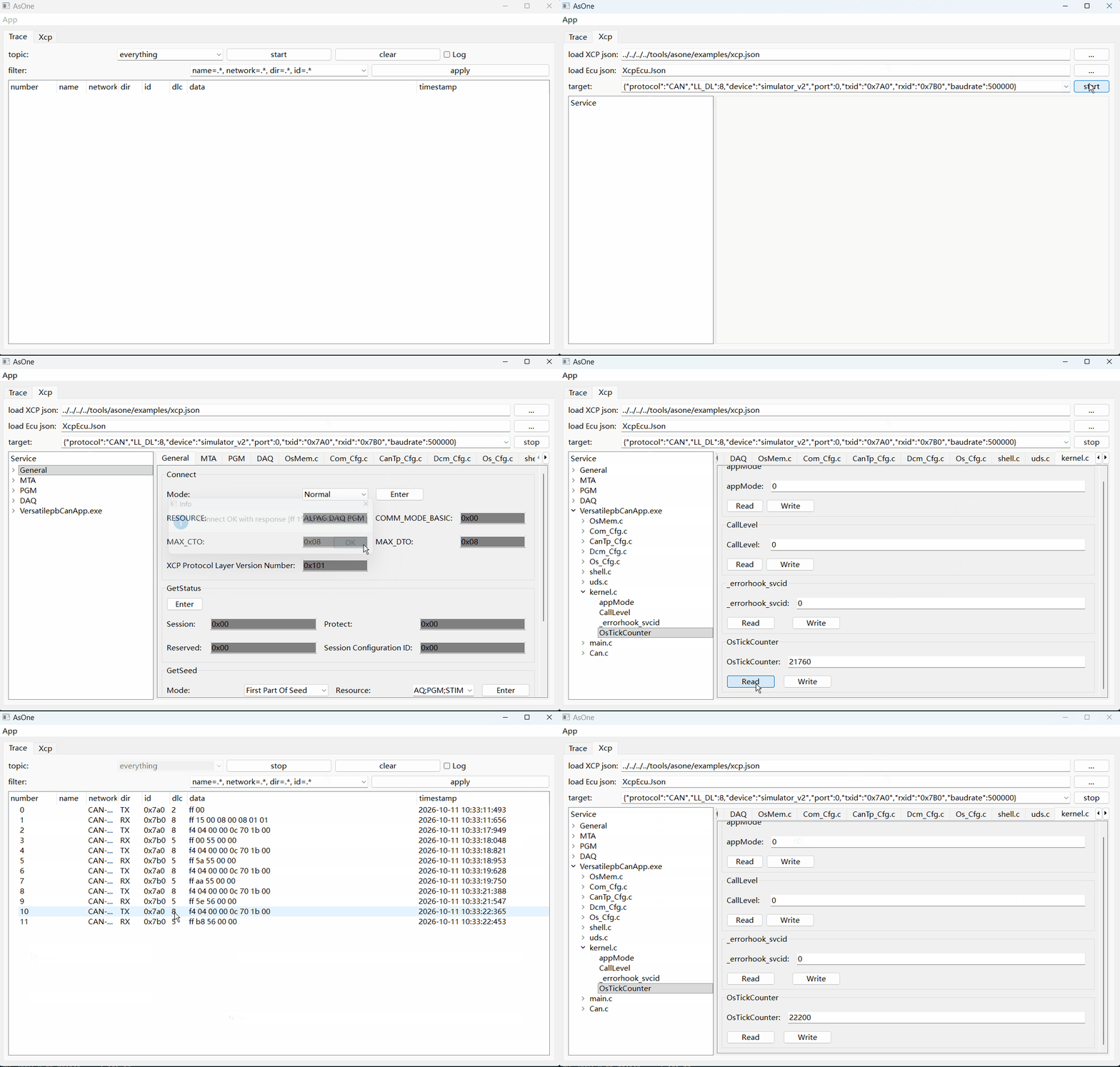
Each UIMeasure widget shows one editable field per datas entry, plus a Read and a Write button. Its total length is the sum of the bit width times the element count of its fields, and it is read as one contiguous block starting at addr. The byte order used to encode and decode the values is the endian from the Ecu json.
5. Reading Variables
Read uploads the bytes at the variable address with SHORT_UPLOAD (0xF4) and feeds them to the field widgets:
| Request | 0xF4 |
Number |
Reserved |
Extension |
Address (4 bytes) |
|---|---|---|---|---|---|
| Meaning | Short Upload | bytes wanted | 0 | 0 = MEMORY | variable address |
One response frame holds LL_DL bytes including the 0xFF positive response code, so a single SHORT_UPLOAD returns at most LL_DL - 1 data bytes (7 with the default LL_DL: 8). A larger variable is read with as many SHORT_UPLOAD requests as needed, each asking for the next piece at an incremented address, and the panel continues from the number of bytes that actually arrived. This slave answers a SHORT_UPLOAD with one frame only — it does not push continuation frames by itself — so the panel must not rely on extra receive() calls to complete a read.
sequenceDiagram
  participant UI as UIMeasure
  participant X as UIXcp transport
  participant ECU as Xcp slave
  UI->>X: SHORT_UPLOAD 0xF4 Number Extension Address
  Note over X: empty_rx_queue(), then transmit
  X->>ECU: CAN frame
  ECU-->>X: 0xFF + data
  alt more bytes expected
    X->>X: receive() again until complete
  end
  X-->>UI: res[1..] -> BitArray -> field widgets
A response whose first byte is not 0xFF is a negative response: 0xFE followed by an NRC, which the formatting helper renders as nrc = ... text (0x23 = write protected, 0x24 = not accessible, and so on) and shows in an error box.
6. Writing Variables
Write assembles the field values into one byte block and downloads it in two steps, because XCP separates “point me at memory” from “here is data”:
- SET_MTA (
0xF6) — set the memory transfer address to the variable address; - DOWNLOAD (
0xF0) — up to 6 data bytes at that address, then DOWNLOAD_NEXT (0xEF) for each following block of 6 bytes.
| Command | 0xF6 |
Reserved (2 bytes) |
Extension |
Address (4 bytes) |
|---|---|---|---|---|
| SET_MTA | Set MTA | 0 | 0 = MEMORY | variable address |
| Command | 0xF0 / 0xEF |
Number |
Data |
|---|---|---|---|
| DOWNLOAD / DOWNLOAD_NEXT | download | bytes in this block | up to 6 bytes |
sequenceDiagram
  participant UI as UIMeasure
  participant X as UIXcp transport
  participant ECU as Xcp slave
  UI->>X: SET_MTA 0xF6 Address
  X->>ECU: CAN frame
  ECU-->>X: 0xFF
  loop each 6-byte block
    UI->>X: DOWNLOAD 0xF0 / DOWNLOAD_NEXT 0xEF Number Data
    X->>ECU: CAN frame
    Note over X: 20 ms pause, intermediate blocks are write only
    ECU-->>X: 0xFF on the last block
  end
  X-->>UI: "download [..] OK"
The intermediate DOWNLOAD_NEXT frames are sent without waiting for a response (res == req), only the last one is acknowledged; a 20 ms delay is inserted between blocks to leave the slave time to program the memory.
7. Build and Run
Step by step, with the QEMU VersatilepbCanApp as the target, in the same console as CAN bootloader intro.
7.1 Build the target application
D:\repository\as>scons --cpl=QemuVersatilepbGCC --app=VersatilepbCanApp
This links build\nt\QemuVersatilepbGCC\VersatilepbCanApp\VersatilepbCanApp.exe. QemuVersatilepbGCC derives from ArmGCC, the compiler that keeps DWARF debug information, so this is the kind of build whose variables can be exported to UIXcp.
7.2 Generate the variable JSON
D:\repository\as>python tools\utils\readelf.py -i build\nt\QemuVersatilepbGCC\VersatilepbCanApp\VersatilepbCanApp.exe -o build\nt\QemuVersatilepbGCC\VersatilepbCanApp\VersatilepbCanApp.json

D:\repository\as>cp build/nt/QemuVersatilepbGCC/VersatilepbCanApp/VersatilepbCanApp.json build/nt/GCC/one/XcpEcu.json
The first command produces 235 variables in 39 source files (Com_Cfg.c, Dcm_Cfg.c, PduR_Cfg.c, Xcp_Cfg.c, kernel.c, …); the second copies it to XcpEcu.Json in the tool’s working directory, the default file load Ecu json looks for. Rerun both commands after every rebuild — see sections 3.1 and 3.4.
7.3 Build the AsOne tool and the XCP panel
D:\repository\as>scons --lib=AsOne
D:\repository\as>scons --app=asone --prebuilt
D:\repository\as>scons --lib=UICommon --prebuilt
D:\repository\as>scons --lib=UIXcp --prebuilt
7.4 Run the target and bridge its CAN
# app console: start the QEMU virtual machine (it brings its own serial-to-CAN)
D:\repository\as>scons --cpl=QemuVersatilepbGCC --app=VersatilepbCanAppRun
qemu-system-arm.exe: -serial tcp:127.0.0.1:9000,server: info: QEMU waiting for connection ...

# sim console: bridge the QEMU serial CAN onto the v2 virtual bus
D:\repository\as>build\nt\GCC\one\CanBridge.exe -d qemu -d simulator_v2
The target exposes its CAN as a serial port on TCP 9000; CanBridge joins it to the simulator_v2 bus, which is exactly the transport named in the target block of xcp.json. An optional packet monitor:
D:\repository\as>build\nt\GCC\one\CanDump.exe -d simulator_v2 -p 0
7.5 Run the tool
D:\repository\as>cd build\nt\GCC\one
D:\repository\as\build\nt\GCC\one>asone.exe
AsOne loads every UI *.dll sitting next to it, so UIXcp.dll shows up as the Xcp tab (asone.exe -u Xcp opens only that panel). Then, in the panel:
| Step | Action |
|---|---|
| 1 | load XCP json — defaults to xcp.json of the current directory, else tools/asone/examples/xcp.json; it supplies the transport, the service list and xcp.lua |
| 2 | load Ecu json — defaults to XcpEcu.Json in the working directory, already placed there by step 7.2; use ... to load a different JSON |
| 3 | target — the target block of the XCP json: CAN, simulator_v2, txid 0x7A0, rxid 0x7B0 |
| 4 | start — builds the tree, opens the bus and calls the Lua xcp_init |
| 5 | press Connect in the General group — establish the session first, the slave only accepts CONNECT first |
| 6 | select a variable in the <App>.exe tree and press Read / Write on the right |
The tree then holds the service groups of the XCP json plus the <App>.exe root with one child per source file; each service of a group has its own form on the right, and both uses can be mixed in the same panel.
7.6 What it looks like on the bus
Once connected, a Connect plus a ShortUpload of lOpenFlag (Can.c, address 0x1B530C, taken from the JSON of that build) appear as:
0x7A0  FF 00                    <- Connect
0x7B0  FF 15 00 08 00 08 01 01  <- positive response: RESOURCE 0x15, MAX_CTO 8, MAX_DTO 8
0x7A0  F4 04 00 00 0C 53 1B 00  <- ShortUpload, 4 bytes from 0x1B530C
0x7B0  FF 01 00 00 00           <- 0xFF + the four bytes: lOpenFlag = 1
The same exchange can be driven without the GUI:
build\nt\GCC\one\CanSend.exe -d simulator_v2 -p 0 -i 7A0 -v FF00
build\nt\GCC\one\CanSend.exe -d simulator_v2 -p 0 -i 7A0 -v F40400000C531B00
For a live session the ECU firmware must register the Xcp slave module — the Xcp entry of the application’s lib list with its Xcp.json service configuration — and expose the two CanIf PDUs the panel talks to, XCP_ON_CAN_RX (0x7A0) / XCP_ON_CAN_TX (0x7B0) with "up": "Xcp", as in app/app/config/Com/CanIf.json. The QEMU target used above has both, which is why the exchange in this section answers.
8. Limitations
- Variables must have static storage and a non-zero address; locals and function parameters are not exported.
- A
constvariable is exported read-only, and a pointer is exported as one read-only 32-bit hex address — neither of them can be calibrated by name. - A value the tooling cannot flatten field by field (a
union, an unresolvable member type, an array of composites that is too large) is exported as a raw byte blob instead of being dropped, so it can be read but not calibrated field by field. - The panel trusts the
endianfrom the json, so the Ecu json and the target must be built from the same configuration. - DWARF is required: a build with
--stripproduces an empty variable list. - The JSON is not regenerated by the build. An application rebuilt without rerunning
readelf.pyleaves the panel reading the old addresses — no error is reported, but the values are wrong, see section 3.4.